Discovery
The Discovery section turns on optional auto-rotation: the profile automatically adds coins that are entering a bullish move, trades them, and drops them when the move fades — without you hand-picking symbols. It is off by default and entirely per-profile.
The master on/off switch at the top of the tab owns the enabled state; the fields below are the tuning.
Discovery → Configuration carries the full field reference — every setting, what it does, what you can set, when to change it, and what to expect — generated from the same schema this tab renders, plus a worked example configuration.
Where candidates drop out
The Where candidates drop out panel shows the last scan as two ladders of filters, each row a bar whose width is how many coins were still in the running at that point. The stage that lost the most, proportionally, is called out as the choke — that is the setting to look at first if nothing is being added.
There are two ladders because there are two different starting sets, and reading them as one would be misleading:
- The first counts every coin priced in your quote coin, narrowing through the asset-type check, your blocklist, volume, movement, spread, and gainers band. The asset-type check drops stablecoins — coins deliberately pinned to a fixed value, usually one US dollar, such as USDC or FDUSD — along with national currencies like the euro. The bot picks coins that are climbing, and a coin designed never to move has nothing to climb, so it would be picked up on the tiny wobble around its peg and then sit in a slot doing nothing. Binance decides which coins count as pegged, and the bot re-reads that list every few minutes, so this is the one row on the ladder with no setting behind it: there is nothing here for you to adjust. The same check also drops BNB, the coin Binance takes trading fees in: the BNB you keep for fees is not a position, and trading it would spend that fee balance.
- The second starts from only the shortlist the bot fetched price history for, and narrows through listing age, trend confirmation, and final eligibility.
The second ladder's top row is therefore much smaller than the first ladder's bottom row. That is by design, not a collapse, so each ladder is drawn against its own starting count and captioned with what it counted.
Below them, a strip charts eligible and added coins over recent scans. One bad scan is luck; a flat line is a setting. If a scan recorded no counts at all, the panel says unknown rather than showing zero — "not recorded" and "nothing survived" are opposite answers.
What the rest of the tab shows
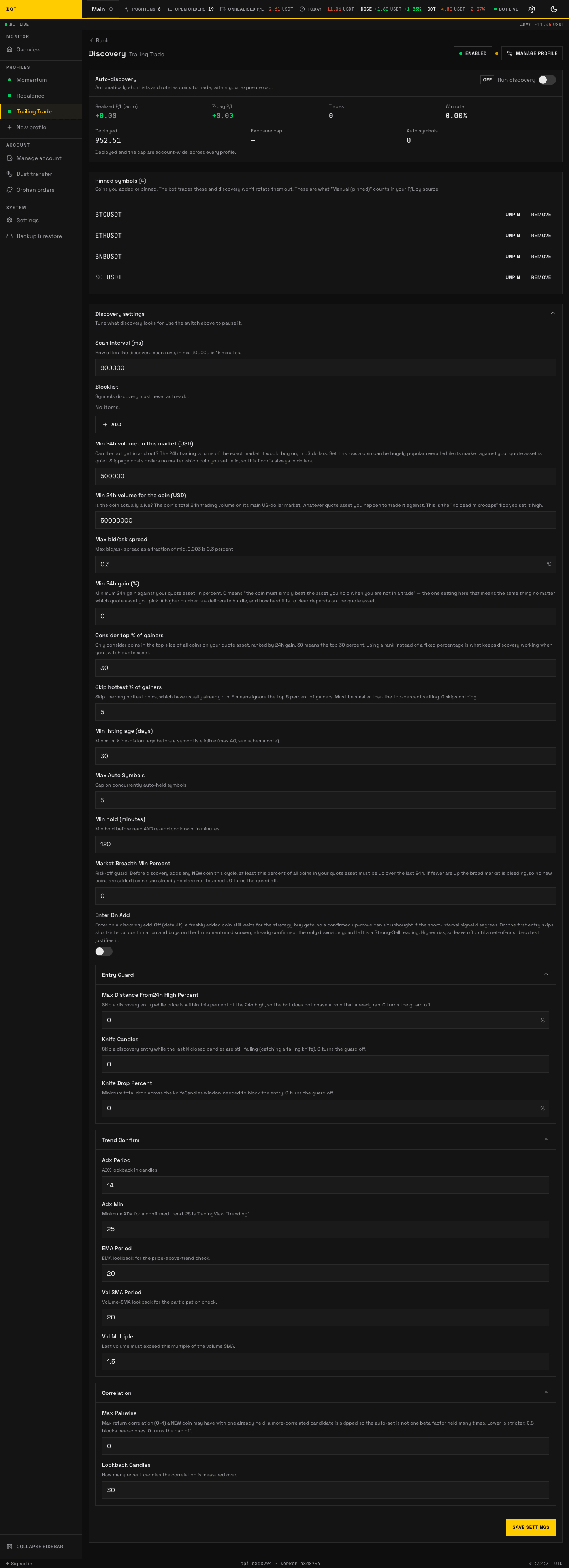
The Discovery tab: the funnel ladders, the auto-rotation scoreboard, and the live universe. Seeded demo data, not a real account.
Below the config editor the tab is a live dashboard, not settings: a scoreboard of candidate coins, the current universe, recent add/drop activity, and controls to pin a coin (keep it regardless of score) or eject one. Those are actions, not stored config, so they are not in the reference table.
Every money figure on the dashboard is shown with the coin it is counted in beside it — your quote coin, the coin the profile buys and sells with. One account can run a USDT-quoted profile alongside a BTC-quoted one, where the same bare number would mean two wildly different amounts. Win rate carries the other kind of supporting note: the number of closed trades it was worked out from, because 100% of one trade and 100% of two hundred are not the same claim.
Net P/L and win rate show Unavailable while contributing fee evidence is incomplete, and win rate shows a dash when the profile has closed no trades at all — "nothing to measure yet" and "measured, but a fee is missing" are different answers. Use Reconcile fees from Manage profile; Recorded P/L and raw fees remain in History → Archive.