Live gate
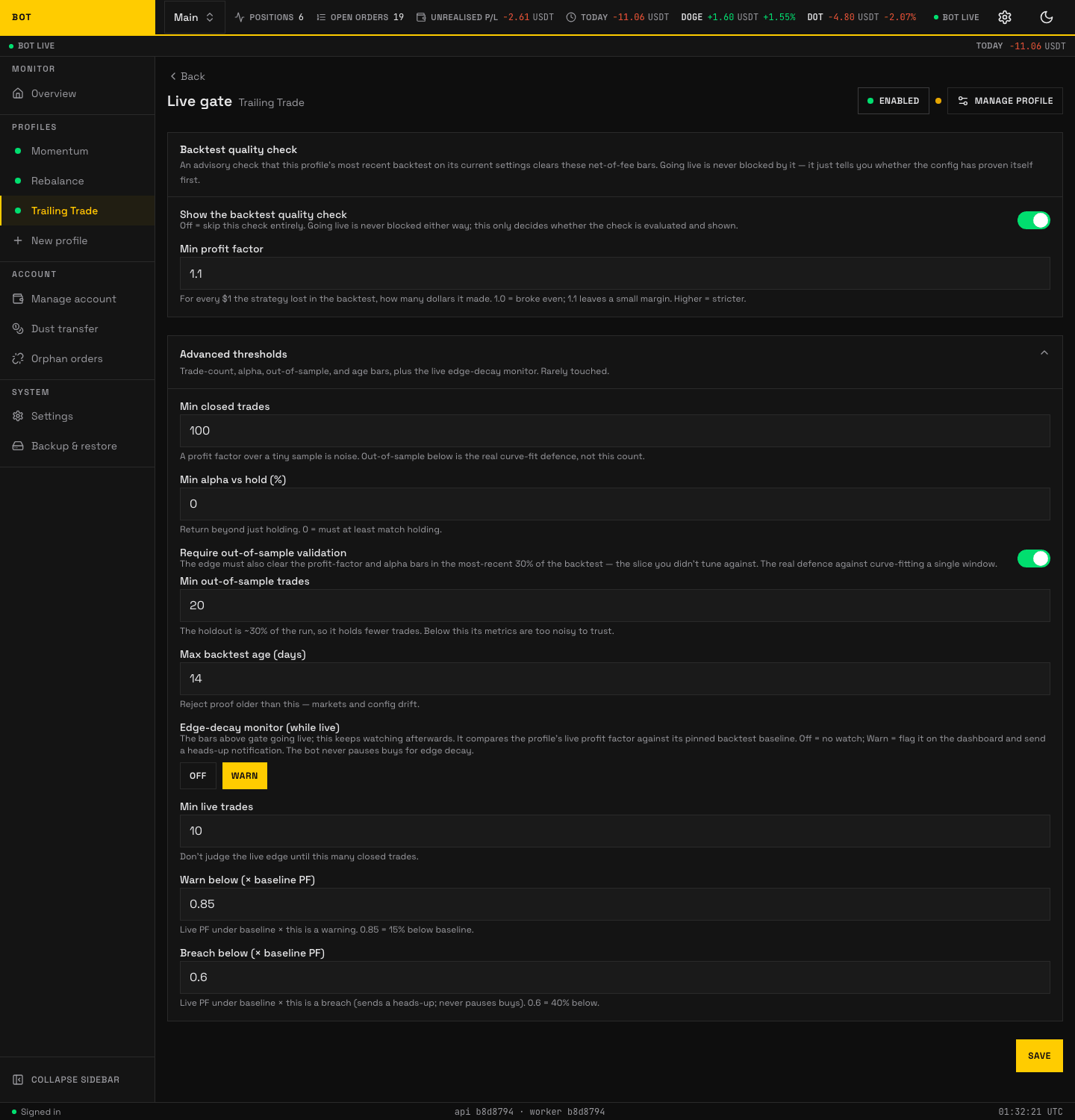
The Live gate section. An advisory quality check on the latest backtest before the profile trades live. Seeded demo data, not a real account.
The Live gate section is an advisory readiness check. It tells you whether the profile's most recent backtest on its current settings clears a set of net-of-fee quality bars.
The gate never blocks going live
Enabling a profile is never blocked by this check. It is a quality signal shown on the dashboard, not a lock. You can go live with a failing or absent check — the gate just tells you whether the config has proven itself first.
The top of the page states where the profile stands in plain words: whether its config cleared the backtest check (and, if not, which checks fell short), and which trades are being compared with which pinned backtest run.
Unlike the strategy and risk sections, this panel is hand-built, so the fields below are listed by hand rather than generated. Labels and help are quoted from the panel.
Backtest quality check
| Field | Default | What it does |
|---|---|---|
| Show the backtest quality check | on | Off skips the check entirely. Going live is never blocked either way; this only decides whether the check is evaluated and shown. |
| Min profit factor | 1.1 |
For every $1 the strategy lost in the backtest, how many dollars it made. 1.0 = broke even; 1.1 leaves a small margin. Higher is stricter. |
Advanced thresholds
Rarely touched — trade-count, alpha, out-of-sample, age, and the live edge-decay monitor.
| Field | Default | What it does |
|---|---|---|
| Min closed trades | 100 |
A profit factor over a tiny sample is noise. Out-of-sample below is the real curve-fit defence, not this count. |
| Min alpha vs hold (%) | 0 |
Return beyond just holding. 0 = must at least match holding. |
| Require out-of-sample validation | on | The edge (a strategy's expected profitable advantage) must also clear the profit-factor and alpha bars in the most-recent 30% of the backtest — the slice you did not tune against. The real defence against curve-fitting a single window. |
| Min out-of-sample trades | 20 |
The holdout is about 30% of the run, so it holds fewer trades. Below this its metrics are too noisy to trust. |
| Max backtest age (days) | 14 |
Reject proof older than this — markets and config drift. |
Edge-decay monitor (while live)
The bars above gate the quality signal before going live; this keeps watching after you are live. It compares the profile's live profit factor against its pinned backtest baseline. The bot never pauses buys for edge decay — at most it flags the dashboard and sends a heads-up.
Only trades recorded since you pinned the baseline count; a trade counts from when the bot recorded it, not when the exchange closed it. After changing the strategy or its settings, pin a backtest of the new config so its results are not judged by the old config's trades. A baseline pinned before pin times were recorded still uses every recorded trade until you pin it again.
| Field | Default | What it does |
|---|---|---|
| Mode | Off |
Off = no watch; Warn = flag it on the dashboard and send a heads-up notification. |
| Min live trades | — | Do not judge the live edge until this many closed trades. |
| Warn below (× baseline profit factor) | 0.85 |
Live profit factor under baseline × this is a warning. 0.85 = 15% below baseline. |
| Breach below (× baseline profit factor) | 0.6 |
Live profit factor under baseline × this is a breach (sends a heads-up; never pauses buys). 0.6 = 40% below. |