Platform administration
The platform control room is at /admin. It is available only to an allowlisted platform
administrator who signed in through an installation sign-in method; the first such method is the
staff provider registered at bootstrap. A workspace sign-in method cannot grant platform-wide
access. The explicitly armed development password account is the only non-production exception.
What platform administrators can do
Every row is gated by the platform administrator grant. Workspace owners and admins cannot perform any of them.
| Area | Actions | What affected people see |
|---|---|---|
| Registrations | Approve, reject with a reason, retry failed provisioning | A durable in-app notification and optional email copy |
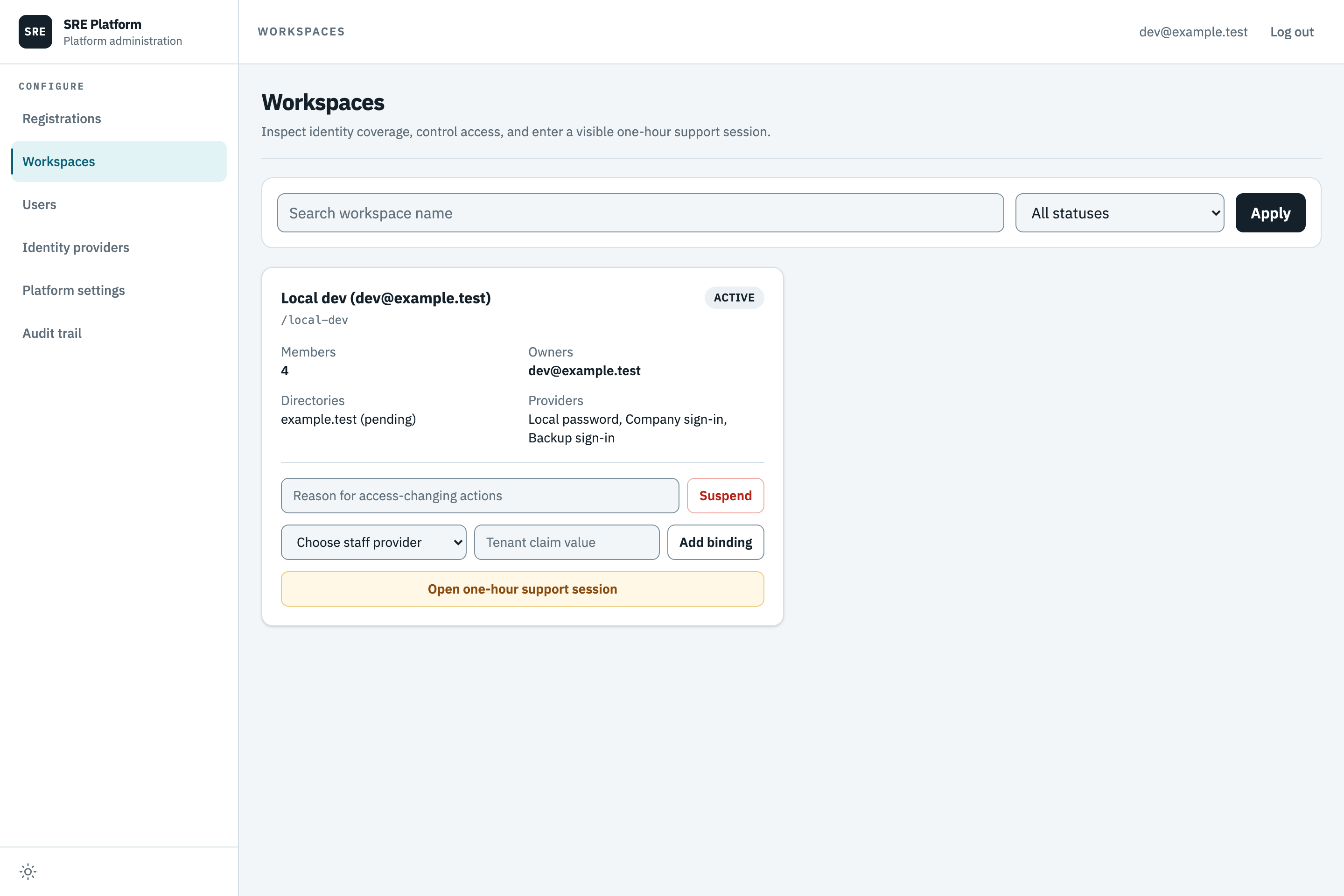
| Workspaces | Recover missing ownership, suspend, reactivate, cancel deletion, clear Require the workspace directory, add a workspace binding, open a one-hour support session | Changes are audited; suspension blocks access; directory-rule and support-session changes notify owners |
| Users | Disable, enable, sign out everywhere, remove a membership, grant or revoke platform administrator access, delete | Disabled and signed-out users receive the matching notification |
| Identity providers | Edit an installation sign-in method's metadata and claims, manage its SCIM credential and settings, view its provisioned accounts | The verifier cache is invalidated; the next sign-in uses the saved values |
| Platform settings | Change registration policy, public copy, model, budgets, retention, and optional SMTP | Public configuration and new work use the saved value without a restart |
| Audit trail | Read every recorded administrator action | Nothing; reading is not a mutation |
The same grant also gates signal policy control on a workspace's Signals page, outside the control room: changing the policy, running an evaluation, switching enforcement on or back to shadow mode, and editing tag-link rules. Reviewing and promoting individual signals is open to workspace members.
A workspace binding maps one exact claim value from an installation sign-in method to one workspace. On the Workspaces screen it is entered as a binding provider and a claim value.
Every successful mutation appends exactly one row to the Audit trail. The row identifies the administrator, action, target, time, supplied reason, and non-secret structured detail. Audit rows are append-only to the application role. Account deletion tombstones the identity rather than removing it, so earlier incident-message attribution and administrator actions remain intelligible. Deletion clears the email but retains the immutable provider issuer and subject to block re-registration with the same identity. Later sign-in attempts cannot restore the cleared email. Older tombstones whose subjects were replaced cannot be reconstructed; revoke their access in the identity provider as well.
Bounded support sessions
Open one-hour support session lets a platform administrator investigate through the ordinary workspace UI. A reason of at least ten characters is required. The database fixes the expiry at one hour from creation; the session cannot be extended.
The dashboard keeps a warning banner visible for the whole session. It names the workspace, shows a second-by-second countdown, and provides End now. The browser includes the opaque session id on authenticated API calls, but the server remains authoritative: it checks the administrator, target workspace, expiry, and ended state on every request. Messages retain the administrator's user id, not a workspace owner's identity.
Every active workspace owner is notified when the support session starts and ends. An expired or ended session is rejected; the dashboard clears the local hint and returns to ordinary routing.
Inside a session you act as a platform administrator, never as a member of the workspace. You can read everything a member can read, and you can take part in an incident conversation, where your messages are attributed to you rather than to anyone in the workspace.
You cannot make a change a member would make. That covers the workspace's data sources, its Slack connection, its service level objectives and its service graph; its membership, its name and its sign-in methods; and its incident record, so resolving, archiving, merging, splitting, tagging, grading, publishing a postmortem, deciding an approval and promoting a signal are all refused. This holds whatever rights you hold in workspaces of your own.
The actions reserved to platform administrators stay available, because a session is the only way to reach a workspace you are not a member of: correcting an ingested signal, and setting the signal policy and tag link rules. Re-checking a connected domain also stays available, because it reads verification state from DNS rather than changing anything, and a domain that will not verify is a common reason to open a session.
Safety rules
- The final platform administrator cannot revoke or delete themselves.
- Removing, demoting or deleting an owner requires another owner with an active account and active membership.
- Only identities from an installation sign-in method can be granted platform administrator access.
- Provider credentials and SMTP passwords are never returned by administrator read routes.
- Workspace suspension and account changes publish live-session revocation after the durable gate commits. The next request also checks the database gate, so access stays denied if live delivery is temporarily unavailable.
Recover workspace ownership
Use this when a workspace has no owner memberships, or all its owner accounts are inactive. Platform-administrator access does not itself grant workspace ownership. Recovery uses the operator’s own platform-administrator authority, including during a support session.
- Open Platform administration → Workspaces.
- On the active workspace, select Recover owner.
- Choose the exact existing active member, enter a reason and select Review recovery.
- Check the named member and workspace. Type the workspace address and select Confirm change.
The server rechecks administrator authority, member status and ownership before saving the role and audit together. Recovery refuses if an active-account owner already exists. If membership changes during recovery, refresh and review the current state before trying again.
Recovery never enables accounts or changes directory or sign-in policy. Inactive owners keep their grants; enabling those accounts restores their owner permissions. Emergency disabling and directory deactivation remain available. An active account does not prove its external sign-in method works.